A single walkthrough of the homelab and how it runs production traffic, from the private LAN to the public edge.
Why I built it
I set three constraints before I bought hardware:
- Zero public ports on my home network
- One private network that connects everything I own
- Production-grade deployments without VPN hacks or SSH pain
Tailscale is the backbone that makes all three realistic.
The homelab layout
This is a Christmas holidays project and still a work in progress. The current layout is temporary while I wait for Ubiquiti gear and a 4U rack.
Both homelabs run on 1 Gbps fiber. No CGNAT, stable latency, and plenty of headroom for backups and remote access.

One mesh, every device
Everything sits on a single Tailscale network:
- Macs, phones, Apple TV
- Raspberry Pi, Synology NAS
- AdGuard DNS, CCTV DVRs, LAN-only devices

MagicDNS resolves by name, so I never hunt for IPs. Everything talks over private 100.x addresses. No port forwarding. No NAT headaches. It feels like a single LAN.
Proxmox cluster
I run two Proxmox nodes in cluster mode for VMs and containers. They power yoginth.com and hey.xyz, plus homelab staples like Plex, Home Assistant, and Beszel for monitoring.

Two locations
A Raspberry Pi in the second site advertises the remote subnet:
192.168.1.0/24
That makes every remote LAN device reachable from anywhere as if it were local.
DNS and security
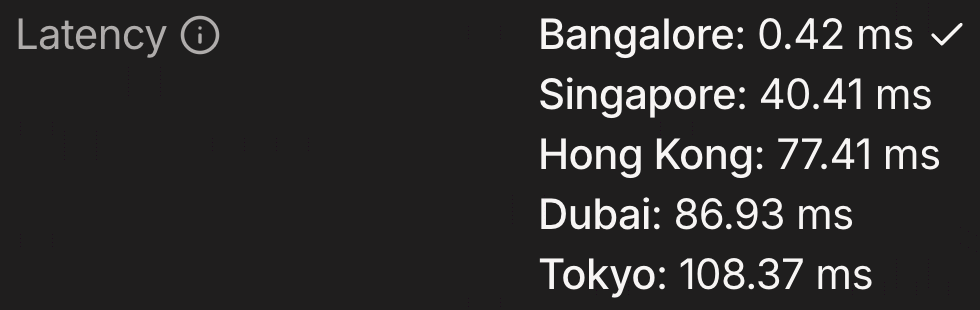
AdGuard runs on a small Vultr VPS. DNS latency over Tailscale DERP is ~0.5 ms, so DNS never feels slow.
Upstream DNS:
- Primary:
1.1.1.1and1.0.0.1 - Fallback:
9.9.9.9
All Tailscale devices use it, and my home router points to it too. Traffic handled: ~100,000 DNS queries per day.
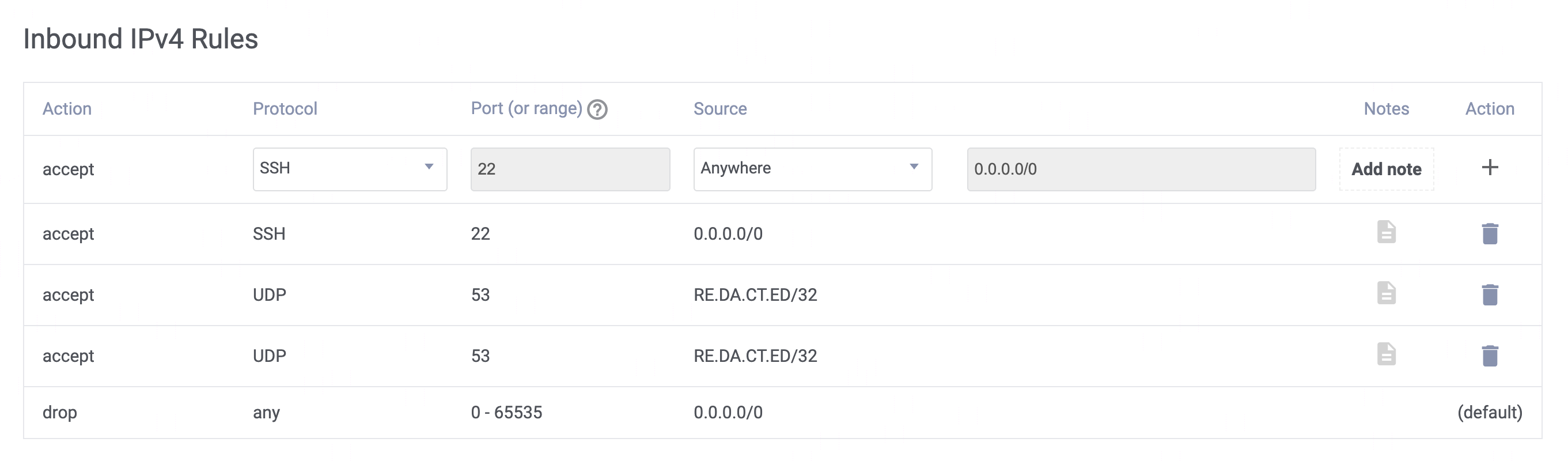
My router uses AdGuard's public DNS IP, and it is locked down under Vultr's firewall rules.

Storage
The NAS is a Synology DS925+:
- Synology HDDs
- 2 x 16 TB drives in SHR
- Usable: 16 TB, 1-drive redundancy


Planned upgrade: add 2 more 16 TB drives for 48 TB usable.
Remote access
Tailscale SSH gives me one-click access from the dashboard. No passwords, no public SSH ports, identity-based access.

Production hosting: yoginth.com + hey.xyz
Caddy runs on a Vultr VPS and handles all HTTP traffic. Caddy makes a Tailscale VPN call to my homelab server on 1 Gbps fiber. The VPS is the only public-facing edge.
DNS:
- A
yoginth.com-> Caddy's public IP - A
hey.xyz-> same Caddy public IP
hey.xyz handles ~1 million network requests daily via Tailscale.
Exact Caddy config:
yoginth.com {
  reverse_proxy server.skate-marlin.ts.net:3000
}

hey.xyz {
  reverse_proxy server.skate-marlin.ts.net:4783
}
Deployments
GitHub Actions deploys directly over the Tailscale mesh:
- Auth to Tailscale
- Resolve via MagicDNS
- Deploy over the mesh
Example workflow run (hey deploy): https://dub.sh/VgKcWcX
All done within 50 ms. Production deploys feel like local deploys.
Final thoughts
This setup gives me:
- 1 Gbps connectivity at home
- Private-by-default networking
- Production-grade deployments
- Full access to every device I own, anywhere
- No port forwarding
- No dynamic DNS hacks
- No SSH anxiety
The homelab is real infrastructure now, not a side project.